The Fast and the Curious: Optimizing Project Builds for Maximum Speed
March 13, 2026
In March 2026 I presented at AppDevCon in Amsterdam. This post covers the key ideas from the talk: a practical guide to understanding why your iOS builds are slow and what you can do about it.
Recording: Watch on Vimeo
The dream vs. reality

Close your eyes for a second and imagine the perfect dev morning: sunlight on the desk, a fresh cup of coffee, the project is open, and you know exactly what you need to do. You make the changes, run the project, and in a snap, the app is launched.
For many of us, that flow sounds like science fiction. My day-to-day reality is definitely messier than that ideal. Yet we know quick feedback loops matter. They shape how we think about code, how often we experiment, and how much friction we tolerate before we stop trying.
A while back I met Peter Steinberger, who reminded me that on the web side he gets builds and tests in seconds. Well, he also thinks we don't need mobile apps altogether, but let's focus at one thing at a time. His point stuck with me: have we, as mobile developers, collectively become numb to slow builds? This talk is my attempt to shake us out of that complacency.
What actually happens during the build?

Instead of obsessing over every phase, I think there's a better question to ask. Let's try "Five Whys":
- We need to build an app. Why?
- CPU cannot run Swift directly. Why?
- Swift code must be translated to machine code. Why?
- Translation isn't "just one step". Why?
- Why does this pipeline feel slow and painful in real life?
The answer is fundamental: Swift and other programming languages have a human-friendly syntax, and device hardware expects hardware-friendly code to execute. The same applies to resources. Everything in between is just translation layers, including resource compilation.
The good news is that Xcode is genuinely trying to help. It's getting better over time, and after the initial build is complete, subsequent builds are faster. Xcode reuses the results of former builds whenever it can. So we effectively have two experiences: clean builds and incremental builds, and Xcode caches aggressively to make the second one feel better.
But even with caching, the process still feels slow. Why?
Why does it still feel slow?
- Compiling Swift is generally slower than compiling many other languages. The Swift compiler is heavy, especially with generics and type inference.
- Your project is big and getting bigger. Our projects keep growing in modules, resources, and targets, so there's simply more stuff to compile.
- AI is making your project even bigger. We're stuffing AI-generated code into those projects, inflating them overnight.
Different goals

This is important to internalize. CI and local development need different optimizations:
- For CI, the clean build (Σ) must be optimized
- For local development, incremental builds (δ) must be fast
Clean build performance depends on the number of CPU cores: it's about parallelizing as much work as possible. Incremental build performance depends on single-core performance: it's about making the critical path as short as possible. These are fundamentally different optimization paths, and conflating them leads to frustration.
Measuring
Before we change anything, we have to measure. Otherwise we're just guessing which knob mattered.
Local: in Xcode
Step one is to enable the build duration indicator inside Xcode so you always see the timer:
defaults write com.apple.dt.Xcode ShowBuildOperationDuration YES

Then use Editor → Open Timeline to understand which phases dominate. Compare the clean build timeline with an incremental one. The shape is very different, and this is where you'll see why the optimizations diverge:
Σ Clean Build:

δ Incremental Build:

A note on XCMetrics
Usually, I would recommend open-source projects for build telemetry, but not today. XCMetrics' server-side part is not building on modern Xcode, and there have been no updates in two years. Be careful before betting your observability on stalled tools.
On CI
Your CI provider probably already tracks build vs. test time. Export that data and watch the trends, not just the last failure. The key question is: do you keep track of build time vs. test time separately?
Upload telemetry to a Google Sheet
Something I learned in my startup years: a Google Sheet can be a surprisingly potent database for build metrics. If you need a lightweight dashboard, it's amazing how far you can get with a simple append script:
require "google/apis/sheets_v4"
require "googleauth"

service = Google::Apis::SheetsV4::SheetsService.new
service.authorization = Google::Auth::ServiceAccountCredentials.make_creds(
  json_key_io: StringIO.new(service_account_json),
  scope: Google::Apis::SheetsV4::AUTH_SPREADSHEETS)

value_range_object = Google::Apis::SheetsV4::ValueRange.new(
  majorDimension: "ROWS", values: values_rows)

response = service.append_spreadsheet_value(
  spreadsheet_id,
  stat_name + "!A2",
  value_range_object,
  value_input_option: VALUE_INPUT_OPTION)
Let's make it faster
With measurements in place, we can finally talk about practical levers.
Less is more

The lowest-hanging fruit is deleting stuff. Retire feature flags, rip out dead code, and let tools guide the cleanup:
- Please don't forget to remove features. It sounds obvious, but abandoned code accumulates fast
- Start by checking disabled feature flags. If it's been off for six months, it's dead
- peripheryapp/periphery can detect unused code automatically. Important caveat: runtime-based dead code detection tools often struggle with SwiftUI code
Caching

There are only two hard things in Computer Science: cache invalidation and naming things.
-- Phil Karlton
Cache invalidation is famously hard, and Xcode shoulders a lot of invisible work (tracking dependencies, timestamps, and previous outputs) to make caching safe. Here's what it does behind the scenes:
- Target dependency graph
- Swift file dependency tracking
- Swift incremental compilation
- Previous build records
- File timestamp changes
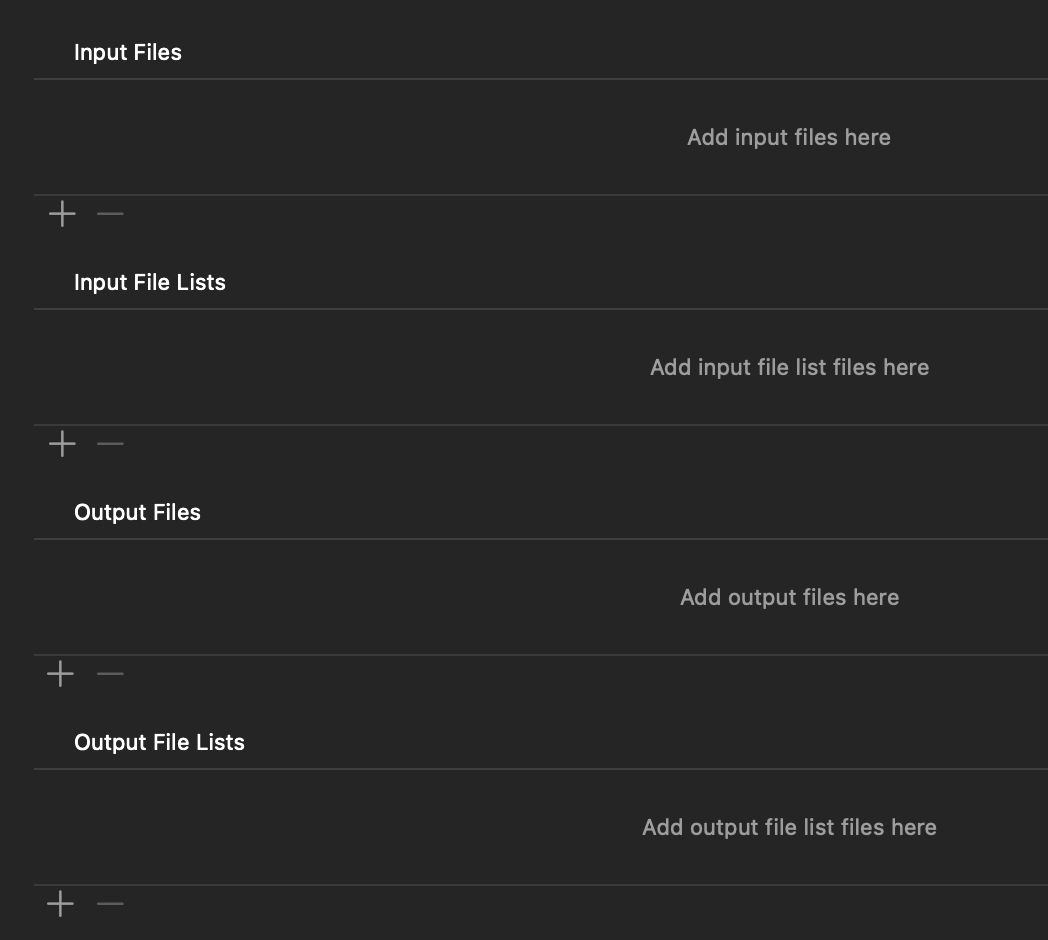
Our job is to feed Xcode accurate information. Declare inputs and outputs correctly so the dependency graph stays trustworthy:
- Correct target inputs and outputs in your Run Script phases
- Avoid scripts that change files every time, as they invalidate the cache on every build
- Check the build timeline for phases that shouldn't be running
Xcode 26 Compilation Caching
With Xcode 26, Apple finally exposes compilation caching officially:
Build settings → Enable Compilation Caching
Xcode stores compiled artifacts keyed by the content of the inputs. It asks: "Have we ever compiled this exact input before?" This is a significant improvement. Lean into the tooling instead of fighting it.
Compile time settings

Most of these settings have correct defaults, but diffs on Xcode projects are notoriously hard to read. You or your colleagues might have adjusted them to a non-ideal configuration without anyone noticing. The following are the knobs you can touch without rewriting your toolchain.
dSYM
Affecting: δ Incremental
DEBUG_INFORMATION_FORMAT[config=Release] = dwarf-with-dsym
DEBUG_INFORMATION_FORMAT[config=Debug] = dwarf
Deferring dSYM generation can shave seconds off incremental builds when you don't need symbols locally. Result: decrease incremental builds by ca. 30%.
Architectures
Affecting: δ, Σ
ARCHS = arm64 x86_64
ONLY_ACTIVE_ARCH[config=Debug] = YES
Building every architecture slice for every run murders both Σ and δ. Build only the active architecture during development. Result: decrease any builds by up to 50%.
Compilation Mode
Affecting: δ Incremental
SWIFT_COMPILATION_MODE[config=Debug] = singlefile
SWIFT_COMPILATION_MODE[config=Release] = wholemodule
Compilation modes dictate whether all files in the module are compiled together or each individually. Compiling individually is more performant for incremental builds, while whole module optimization produces better release binaries.
Optimization Level
Affecting: δ Incremental
SWIFT_OPTIMIZATION_LEVEL[config=Debug] = -Onone
SWIFT_OPTIMIZATION_LEVEL[config=Release] = -O
Optimization levels aren't free either. Debug with no optimizations keeps incremental builds happy unless you're profiling.
Understanding the compilation pipeline
At a high level, the compilation pipeline looks like this:
Xcode → swift-driver → swift-frontend → LLVM → linker
When builds feel slow, we often blame the compiler. But most of the time, the Swift Driver is making conservative decisions because it cannot safely reuse results. If you change one file, the driver decides: only recompile that file, recompile dependent files, rebuild the whole module, or invalidate downstream modules. Understanding these phases helps you read build logs and identify the actual bottleneck.
Flags to indicate inter-target dependencies
This comes in handy for modularized multi-target setups. Xcode exposes flags that declare inter-target dependencies more explicitly, which keeps incremental builds faster:
- Build Phases → Target Dependencies
- Library Configuration:
BUILD_LIBRARY_FOR_DISTRIBUTION,SWIFT_ENABLE_LIBRARY_EVOLUTION,SWIFT_MODULE_INTERFACE - Run Script Input/Output configuration
Warnings for compilation duration
Add these to Other Swift Flags (OTHER_SWIFT_FLAGS) to catch slow type-checking before CI does:
-Xfrontend -warn-long-expression-type-checking=100
-Xfrontend -warn-long-function-bodies=100
If a function takes more than 100ms to type-check, you'll see it as a warning right in Xcode.
Other useful diagnostic flags
When in doubt, turn on the profiling flags so you can watch compilation phases, driver timing, and stats output:
-Xfrontend -debug-time-function-bodies
-Xfrontend -debug-time-compilation
-Xswiftc -driver-time-compilation
-Xfrontend -stats-output-dir
Dependencies in Swift Package Manager
Affecting: Σ Clean Build
Now let's switch gears to dependencies, because Swift Package Manager can secretly torpedo clean builds. I love SPM, but you need to be aware of how it works: package resolution requires dependency repo checkout, and those repos might be gigabytes big.
Option 1: Use a Package Registry
A registry is the cleanest fix. It removes the git clone step completely, turning what can be minutes of package resolution into seconds. Tuist has opened theirs.
Option 2: Cache the checkouts folder
If a registry isn't an option, cache your SourcePackages/checkouts folder so resolution reuses the bytes you already cloned once. Use the -clonedSourcePackagesDirPath flag to point Xcode to the cache:
xcodebuild \
  -resolvePackageDependencies \
  -scheme BuildTimeDemo \
  -clonedSourcePackagesDirPath "$HOME/.cache/spm-checkouts"
On CI, pair that flag with a cache step keyed off Package.resolved so runners share the same tarball of dependencies. GitHub Actions example:
- name: Cache SPM checkouts
  uses: actions/cache@v4
  with:
    path: ~/.cache/spm-checkouts
    key: ${{ runner.os }}-spm-${{ hashFiles('**/Package.resolved') }}
    restore-keys: ${{ runner.os }}-spm-

- name: Resolve Swift packages
  run: >
    xcodebuild -resolvePackageDependencies
    -scheme BuildTimeDemo
    -clonedSourcePackagesDirPath $HOME/.cache/spm-checkouts
Resources packaging
Resources deserve the same scrutiny as code. Huge asset catalogs and ML models can invalidate caches just as fast as Swift files. Resource assembly could be as slow as compilation, and it scales poorly in monoliths:
- Split large asset catalogs into target-specific bundles
- Cache downloaded resources outside of Xcode projects
- Use
xcassetspruning tools to remove unused images, prefer vectors - Move marketing-only images into separate, optional bundles
And while we're here: Cocoapods are deprecated, and they have a significant issue with asset catalog compilation. Their asset handling slows builds dramatically. More in my earlier post.
Modularization

All of this leads to modularization, because smaller modules give the build system less to reason about per change.
Monoliths are bad for incremental builds. It's hard for Xcode to understand cause and effect and dependencies inside a single large module. When everything is connected, changing one file can invalidate the entire build graph. The same applies to humans and AI: if a module is too big to comprehend, it's too big to optimize.
What if it were possible to compile less code, without removing it?
Imagine if we could keep every feature yet only compile the slice we just touched. That's the challenge, and there are real solutions.
Tuist
Tuist is my favorite answer to this challenge:
- Declarative project description that keeps modules consistent
- Remote binary caching supports local and remote builds
tuist generatecreates lightweight workspaces for a single target- Paid, but worth it
Under the hood, Tuist fingerprints every target based on its sources, build settings, and dependencies. On project generation, it checks if a prebuilt version matching the fingerprint is available locally or from the server. It then replaces targets you are not actively working on with their binary representation, so you only compile what you actually changed.
Bazel & Buck
If you need something even more advanced, Bazel and Buck deliver hermetic, multi-language builds with remote execution for teams willing to invest:
- Hermetic builds: every dependency pinned, ideal for massive clean builds
- Remote execution + shared cache can make CI builds dramatically faster
- Multi-language support keeps app + backend tooling aligned
- Requires a dedicated tooling team but pays off at scale
Comparison
| Problem | Tuist | Bazel & Buck |
|---|---|---|
| Graph clarity | good | strict |
| Remote cache | yes | yes |
| Dev friction | low | high |
| Migration cost | low | extreme |
Tuist favors ergonomics, while Bazel and Buck go all-in on strict graphs and shared caches. For most iOS teams, Tuist is the pragmatic choice.
Personal experience
In one of my former companies, I went with Tuist. The numbers are real:
- CI Σ Clean Build went from 35 to 11 minutes
- δ Incremental Build went from 30 to 15 seconds
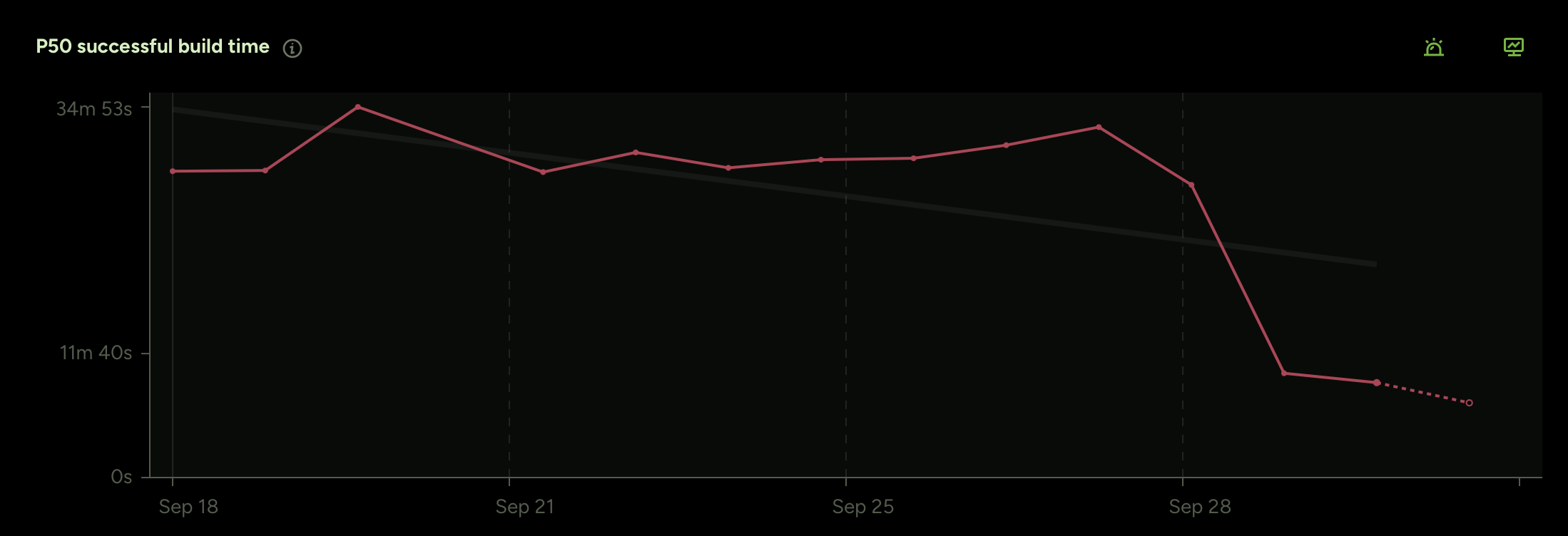
Selective testing brought additional improvements on top of that. Since the tooling understands the full dependency graph, it can determine which tests are actually affected by a given change instead of running the entire test suite on every commit:
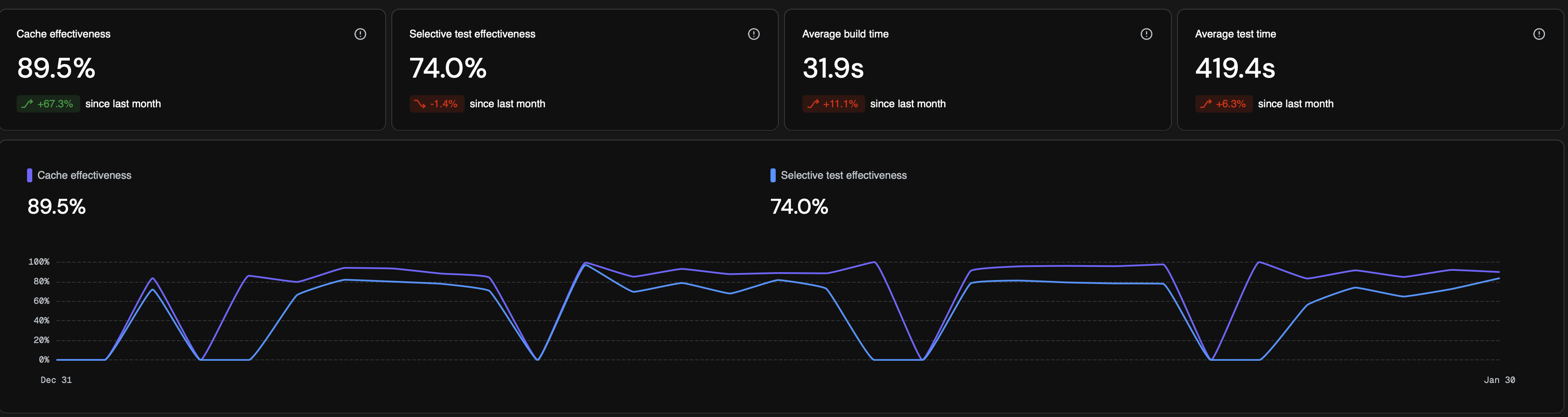
Free selective testing tool: github.com/mikeger/XcodeSelectiveTesting.
Takeaways
- Less code is better. Delete ruthlessly, retire feature flags, rip out dead code
- Faster CPUs are not going to save us. The problem is structural, not computational
- Modularize your app. Give the build system smaller units to reason about